

The EY2 LCD is a central display, the true brain driving your electric scooter, providing you with essential information about your vehicle. Although this revolutionary gadget is very useful, its operation can sometimes seem confusing to some users.
If you ever lost your user manual or can't understand the manual which can sometimes seem complex, this complete guide to mastering your EY2 LCD Minimotors is perfect. If you are confused and still don't know which display is right for you, Weebot has written a blog article to help you choose based on your criteria.

However, it also offers the possibility to unlock your scooter or customize the color of your LEDs. With its many features, the EY2 offers a wide range of options that can sometimes seem complex. This comprehensive guide will walk you through all aspects of this technological gem. Let's get started!
Access settings
| Press and hold the power button to turn the scooter on/off. |
Settings via the app
| Downloading the Minimotors app. |
| Registering the scooter via the serial number. |
| Configuring various options via the app. |

How to connect to your EY2 from your smartphone?
| Using the Minimotors app on an iPhone from the Apple Store or on the Google Store. |
| Access to the "My Setting" menu to initialize the device. |
| Searching for and selecting the scooter. |
| Pairing confirmation and serial number entry. |
| Original password configuration (default 4 x 0 or 1 2 3 4 but modifiable). |
| Return to the main menu with the connected scooter. |
EY2: Explore Its Innovative Features
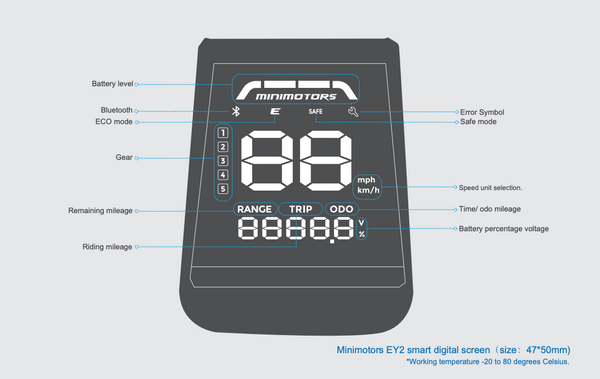
| Current Speed: Displays the instantaneous speed of your scooter. |
| Remaining Range: Estimated distance you can travel before needing to recharge the battery. |
| Driving Mode: Indicates the selected driving mode (e.g., Eco, Normal, Sport). |
| Battery Level: Indicates the battery charge level as a percentage. |
| Odometer: Displays the total distance traveled by the scooter. |
EY2 Display Error Codes: What Do They Mean?
There are four main errors that can occur: motor fault, controller fault, display/throttle fault, and high controller temperature. When the electric scooter detects one of these issues, it displays the corresponding icon. The most common is the display/throttle fault, and sometimes you can fix it by checking and securing the wiring around the cockpit. A high controller temperature is also quite common and can be resolved by stopping the use of the electric scooter and letting it cool down completely.

|
Motor fault |
 |
: Controller fault |
 |
: Display/throttle fault |
 |
: High temperature of the controller |
- Dualtron Pop
- Dualtron Togo
Warning: EY2 LCD screens are not compatible with any electric scooters from the Rovoron range and speedway.
Conclusion
The EY2 LCD offers an extensive range of settings to customize your riding experience. With this comprehensive guide, you have the ability to configure the EY2 screen according to your preferences, allowing you to get the most out of your Dualtron electric scooter. In summary, although the EY2 may seem complex at first, once mastered, it offers a multitude of useful features that enhance the riding experience. We hope this guide has provided you with a better understanding of your display, thereby improving your electric scooter rides. Please refer to your scooter's user manual for more specific information, as some settings may not be available on all models. Be careful when adjusting settings, as this could affect your scooter's performance and safety.
FAQ
What is the purpose of an EY2 display?
Display of speed, turn signals, warnings, light status, Bluetooth connection, and SAFE mode.
Is there a Bluetooth-free version of the EY2?
No, there is currently no EY2 without Bluetooth.
Which electric scooters are compatible with the EY2?
The EY2 display is available on the Dualtron Togo and the Dualtron Pop
What are the main features of the EY2 display?
The EY2 LCD display offers a range of features, including:
- Real-Time Speed Display
- Distance Traveled Display
- Battery Level Display
- Driving Mode Selection
- Speed Limiter
- Engine Settings Adjustment
- Bluetooth connectivity